

- 1
Calling All Afterschool Digital Learning Champions!
Wednesday, 16 May 2018 00:00
We're looking for professionals who are passionate about integrating technology into their program to become an official Afterschool Digital Learning Champion. Digital Learning Champions will be entered into a drawing to win a VISA gift card and will receive a unique digital champion badge.
Here’s what it takes to be an Afterschool Digital Learning Champion:
 Take the entry survey immediately. This survey will help us learn more about who is using the Toolkit and why. Take Entry Survey
 Complete the exit surveys at the end of EACH module.
Access Technology and Devices
Thursday, 05 April 2018 00:00 This module should take you 20-30 minutes to complete.
Identify your tech needs and find resources in order to offer access to the internet, devices, and tech support during afterschool hours.
| REFLECT |
- What kinds of technology do you want to bring into your program?
- What schools, community organizations, or other partners already have the equipment you need?
- What avenues have you explored to allow your program to access technology, devices, the internet, or IT support?
Is it a challenge for you to provide students with access to technology and devices in your program? Unfortunately, you’re not alone. Many afterschool professionals say that access to technology is a large barrier to their program’s integration of digital learning. You may need to be creative to surmount this obstacle. Fortunately, afterschool professionals are very creative! In this module, you’ll learn new ways that you can access and maintain your devices.
>>WHAT WILL YOU LEARN?
This module will help you understand how programs access devices and maintain the devices they have. In this module, you can expect to accomplish the following:
- Follow an easy process to acquire the devices your program needs.
- Understand how to collaborate with community-based organizations to access and maintain devices.
- Amplify your creativity by learning about unique ways groups have brought technology to their programs.
>>WHAT DOES IT MEAN TO ACCESS TECHNOLOGY?
A few helpful definitions will get you started with this module!
Technology is the wide range of tools and devices such as tablets, computers, cell phones, 3D printers, and more.
Access to technology is the program infrastructure including the internet and wi-fi.
Information Technology (IT) support is a person or group of people who can fix the devices and internet when there are problems. IT support is critical for programs that utilize these tools. Some programs have tech devices but do not use the technology because they lack IT support.

>>IN PRACTICE
How are you accessing technology? We're looking for stories to share with the community about programs that are accessing technology and how you made it happen.
If you have a good case study to share, please email us.
>>ARE YOU READY?
You may already have some devices or you may have internet access; maybe you have both; maybe you have neither! This module will help you figure out what you have and what you need in order to connect your students to digital learning opportunities. If you’re uncertain that you have the expertise to start planning, you can ask for help from a Computer Science teacher, a tech-savvy librarian, a parent who works in the tech industry, or another technology educator as you work through the process.
>>PROCESS FOR ACCESSING TECHNOLOGY IN YOUR PROGRAM
You can acquire technology for your program by considering a few questions.
- Identify your needs. Talk with your staff and stakeholders and consult your program’s vision statement to determine what kinds of technology you need in order to help you reach your program goals.
- Take inventory. Determine what your program already has or has access to. Note the gaps between what you need and what you have. Prioritize your needs.
- Consider your options. Consider your budget as well as staffing, management, and maintenance of devices. Then, decide whether to purchase equipment or to partner with another organization.
- Make a plan. If you decide to purchase equipment, cost out your needs and make a plan to expand your program budget. If you decide to pursue partnerships, schedule time to talk with potential partners and develop a shared-use agreement.
1. Identify your needs.
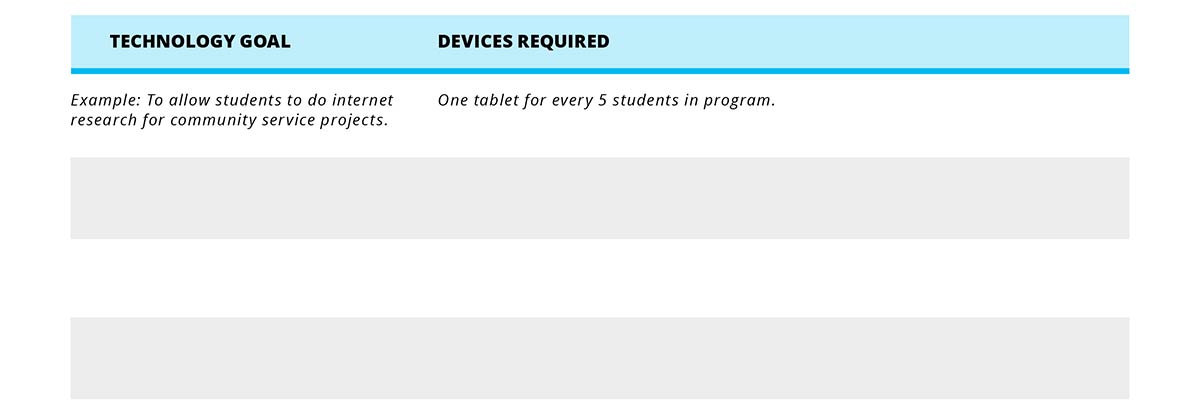
What are your program goals? Are you looking for devices for students to use for homework? Do you want students to collect data as part of a project? Do you want students to be able to explore digital photography, videography, or animation? What tools align with the learning goals of your program?
2. Take inventory.
The next step is to determine what technology you have and what you need. Think about:
- Equipment
- Infrastructure
- Staff support
- How staff use technology
- How students use technology
- Community resources
- Budget
Complete the following Technology Inventory Checklists to help you consider what you already have available. Then, make notes about what you need to acquire.
DOWNLOAD TECHNOLOGY INVENTORY CHECKLISTS
3. Consider options.
Now that you’ve completed the inventory to identify what you have and what you need, it’s time to figure out ways to get it including seeking funding, partnerships, and program volunteers.
DOWNLOAD MAKING OUR TECHNOLOGY WISH LIST A REALITY
Purchasing New Apps or Software Considerations
Ideally, you’ll be working toward integrating technology into your daily programming. If you have decided that in order to meet your goals, you need to purchase software or apps, here are some tips to help you avoid buyer’s remorse.
Review the following list of considerations before purchasing new apps or software for your program.
If your program has decided to purchase new apps or software ...
- Has anyone we know purchased or used this technology? If so, can we ask about their experience with the technology?
- How does this technology help meet the learning goals we have set for students?
- How does the technology align with our program’s digital learning goals? Does it provide the skills, knowledge, behaviors, etc., that we say we want?
- Is this technology age and developmentally appropriate? If not, can we easily adapt it?
- Does the technology help staff foster relationships or set high expectations or create opportunities for students to connect, navigate, or be productive?
- What do students need to know before they can use this technology?
- Do we need to set new or different expectations or guidelines for using this technology?
- What do staff need to know before they can implement this technology?
- Will staff need additional supplies/resources?
- Is this technology something the program can either reuse or remake after it’s been used one time, or is it a one and done resource?
- If we buy this technology, will it exceed our budget? If so, what can we purchase that is similar and less expensive?
- How soon do we need this technology, and can it be delivered/downloaded/accessed in time?
4. Make a Plan.
Sometimes it makes sense for your program to purchase devices. Other times it is important to stretch your limited budget. Partnerships and collaboration can help your program save money, so consider working with area schools and libraries to purchase internet and equipment. You can make a solid plan to consider all of these possibilities to acquire the technology and devices you need by exploring:
- Building community partnerships for sharing technology
- Discounts to purchase technology
- Creative solutions to acquire devices, internet, and staff support
Let’s look at each of these areas in more detail.
Build Community Partnerships for Sharing Technology
One of the best ways to access technology is by developing partnerships with other organizations that have either what you need or the same need as your program. Partnerships can help you maximize your limited budget and access tools you might not be able to access on your own. In addition, you can share subscription, upkeep, and infrastructure costs between organizations.
When you are looking for community partners, look for partners who typically invest in internet, devices, and tech support such as libraries and schools.
- Libraries are becoming hubs of engaging activities that include spaces for coding, digital creation, social media awareness, résumé and profile building, and maker labs.
- Schools are busy buying mobile technology and creating media centers where the entire school community can access the technology they need.
- MakerSpaces are often located in community centers and offer community members equipment to realize their own projects and visions.
Sometimes partnerships look great on paper but are difficult to create in real life. For example, many afterschool programs report that their school partners do not share devices. To break down this barrier:
- Build and maintain relationships with organization staff. Community Partnerships around technology hinge on great relationships, so spend the time connecting with partners.
- Align your organizational goals. Be sure that both organizations will contribute to and benefit from the partnership.
- Use the talking points in the Promote Digital Learning in Afterschool module to support your partnership building.
Shared-Use Agreements Can Help
Regardless of how you build your partnership, it is vital to capture the partnership with a Shared-Use Agreement. Capturing the partnership in writing is important so that the partnership can sustain:
- Staff turnover
- Equipment damage, theft, and replacement
- Funding changes
Write a specific and clear shared-use agreement so your organizations can look to the agreement in the case of partnership friction or expansion.
Shared-use agreements should:
- Name the organizations partnering.
- Specifically describe the shared use.
- Explicitly define the parameters of the partnership.
- Define the benefits of the agreement for each party.
- Define the commitment each organization is making.
- Define the length of the agreement.
- Clearly offer the process for modifying, extending, or ending the partnership.
Complete this sample Shared-Use Agreement template to get started.
Discounts for Purchasing Technology
Even if you have developed a successful partnership, purchasing technology and systems to support it can be expensive. The good news is that you might be able to find devices and services at a discounted rate, particularly if you work in a school or non-profit organization. Wherever you are shopping, it never hurts to ask about an educator’s or non-profit rate. Below are some specific programs designed to help defray the cost of technology.
E-Rate Program for Schools and Libraries
If your school or library does not have internet access, you can help them get it through the E-Rate program. Administered by the Universal Service Administrative Company (USAC), the E-Rate program helps ensure that schools and libraries can obtain high-speed Internet access at affordable rates. The E-Rate program is specifically for schools and libraries, but other facilities/programs may also be eligible for discounts, including:
- School buildings that generally don't contain classrooms (for example, school administrative buildings, school bus barns, school stadiums) or library buildings that don't have areas open to the public (for example, library administrative buildings, library technology centers, bookmobile garages)
- Non-traditional elementary and secondary education programs such as Head Start, prekindergarten, juvenile justice, adult education, etc.
You can apply for discounted services including wireless internet, satellite service, leased lit or dark fiber, and repair and upkeep of hardware. Discounts range from 20% to 90% of the cost of eligible services and are based on the percentage of students eligible for the National School Lunch Program in the school district, urban or rural status, and type of service.
The funding year for this program is July 1 - June 30, and applications are due in March. It is important to note that before you apply, you will need to undergo a competitive bidding process to select a service provider, and this process must be open for at least 28 days. So be sure to set aside plenty of time for the process before the application is due if this is a resource your school or library is interested in.
The USAC also directly supports students and their families living in poverty by providing discounted phone and internet services. Depending on the population of students your program serves, consider sharing this information with families.
Everyone On Resources
Everyone On is a national nonprofit organization working to provide internet access, free training, and donated or discounted equipment to everyone across the US who is currently unconnected. Their primary goal is to eliminate the digital divide, and they currently have partnerships with some afterschool organizations. Your program may be able to access resources from Everyone On, and it is also an organization you may want to connect families to.
Nonprofit Discounts and Donations from TechSoup
Many companies offer low-cost equipment or services for nonprofits and / or educators. You can search online for “tech discounts nonprofit” or “tech discount educator”. Check the details of any offer to be sure that you qualify.
If you conduct this search, you many notice that TechSoup often appears in your list. TechSoup is a organization that connects nonprofits to technology resources including donated devices and hardware, discounted software, low-cost IT services, training, etc. If your program is a 501(c)3 nonprofit or library, it probably qualifies for resources from TechSoup. For a small administrative fee, you can expand your technology access pretty quickly with help from the TechSoup team.
Most of the resources on TechSoup do require at least a small admin fee, but there is a wealth of information available at the site for free. You can search for the type of hardware or software you are looking for on the site, and get an idea for what might be available as you build your plan.
A Word About Donations
Sometimes, local businesses or partners want to donate their used equipment to nonprofit or education organizations. Some of this equipment may be just a few years old, and still fully functional. This can be a great windfall for your program. However, it is important to be sure before you accept a donation that the equipment still has a decent lifespan, so that you won’t be spending too many resources on maintenance.
Finding Funds
If you are clear about your goals in adding technology, and can show how the technology will further your mission, you may want to consider writing a grant proposal to have your new equipment funded. Several funders are interested in closing the opportunity gap, increasing the number of STEM activities available to youth, and supporting children’s skills in using technology. The Afterschool Alliance has compiled several resources to help you prospect for grants, including a guide to STEM funding and an comprehensive list of funding sources for STEM Education Grants. To view these resources, visit http://www.afterschoolalliance.org/STEMfunding.cfm
Some of the funding streams you come across will be clearly intended for K-12 educators, but as long as you meet the eligibility requirements, you can still apply. As afterschool educators, you may have to do some advocacy to funders to explain that technology education is important outside, as well as within the school day. The Afterschool Alliance has statistics, reports, and fact sheets to help you make this case.
Creative Solutions for Acquiring Technology Devices and Internet Access
If you’ve tried all the tips above, and are still struggling with the cost to add technology in your program, you may have to think even more creatively. Afterschool educators are famously resourceful, and each solution must be tailored to the individual program’s needs and resources. Here are a few creative solutions that programs have come up with. See if any of these might work for you, or spark other ideas about how you can add technology to your program.
Students build their own computers.
Shawn Petty from Westat works with programs in Texas to help students build their own computers. By using Raspberry Pi and Arduino, or other microcontroller kits, students can build computers. With a computer kit from Kano, students can build their own computers and operating systems. Then, students know how to fix anything that may go wrong.
Wi-Fi Buses
In places without internet service, a bus with a wi-fi hotspot and an antenna can work as a creative alternative. If internet service is shared with other organizations for occasional visits, as a library bookmobile for the digital age, this could work as a way to share the costs of a mobile wi-fi connection in an otherwise inaccessible area. This could also serve rural communities who don’t have access to traditional afterschool programming by bringing some programming to students on the bus ride home.
Finding Volunteer Staff for Technical Support
If you don’t have the capacity to pay a part-time staff person to work with you to service your devices, consider looking for a part-time volunteer.
Hire New Volunteers
- Look for retirees and other volunteers with IT backgrounds.
- Access partners’ staff including school day IT staff and library IT staff.
- Be clear about what you’re looking for. See the Train and Support Staff module for instructions on writing compelling job descriptions.
Hire Youth as Tech Support
- TechSpot, an outgrowth of a 21st Century Learning Community-funded program in Skowhegan, ME, has a student-run technology help center in the community’s downtown. The unique collaborative is run by students and volunteers with a goal of allowing students to become teachers in a multigenerational environment. The collaborative allows students to share their knowledge of technology with the community.

>>TAKE ACTION
Get started today! These questions will help you take what you’ve read and move forward.
- What will you do to build a clear plan to acquire and maintain devices?
- How can you collaborate with partner organizations to access technology?
- What creative solutions can help you navigate obstacles?
>>RESOURCES
- Universal Service Administrative Company (USAC), the E-Rate program helps ensure that schools and libraries can obtain high-speed Internet access at affordable rates.
- TechSoup offers discounted software, hardware, IT support services, and training.
WHAT'S NEXT?
- Continue learning with the next module of the Toolkit.
- Video Training Recordings
- Share your thoughts and participate in community chats on Twitter by using the hashtag #AfterschoolTech.
Main photo courtesy of Alaska Afterschool Network.
Address Equity Through Digital Learning
Thursday, 05 April 2018 00:00This module should take you 16-21 minutes to complete.
Assess the most relevant equity issues related to technology and digital learning in your program and/or community and create a plan to address them within your program.
| REFLECT |
- Do we know what inequities our students face when it comes to digital access and digital use?
- How do we currently address these inequities in our program?
- What more do we need to learn about the barriers to access to technology and digital learning that our students may be facing?
You may already have a good sense of the most pressing equity issues that students and families in your program face. If this is the case, honing in on how the equity issues impact students in relationship to digital learning and technology can help you determine how your program can address these disparities.
>>WHAT WILL YOU LEARN
This section will help you look more deeply at the equity issues your students face related to technology and digital learning. It will also help you begin to address them. In this section you can expect to accomplish the following:
- Identify the equity issues students in your school/community face related to digital learning and technology.
- Gain an understanding of some common equity issues at the heart of the digital divide.
- Learn strategies to help low-income and marginalized students gain or maintain access to technology and quality digital learning opportunities.
>>WHAT DOES IT MEAN TO ADDRESS EQUITY RELATED TO TECHNOLOGY AND DIGITAL LEARNING?
As you move forward with your efforts to address equity related to technology and digital learning, it is important to be clear and have everyone on the same page about what the language means. Here are some definitions that may be helpful for you and your stakeholders:
Equity means that each person or group has equal access to economic, social, and educational opportunities. For members of groups that have been excluded from resources, equity may involve providing greater resources to compensate for past exclusion and discrimination.
The digital divide is the socioeconomic and educational disparity between people who have opportunities and skills enabling them to benefit from digital resources, especially the internet, and those who do not.
Access in relationship to the digital divide, means students have access to computers, the internet, and other information technologies, as well as opportunities to not only be consumers of technology but also producers.
>>WHY IS IT IMPORTANT TO HELP CLOSE THE DIGITAL DIVIDE IN YOUR PROGRAM?
Becoming familiar with how the digital divide impacts your students can help you identify strategies to close the gap in your program. There are education, social, and economic equity impacts of the digital divide that affect young people.
Educational Impact:
- In a 2015 survey, nearly half of all students reported that they have been prevented from completing a homework assignment because they lacked access to the internet or a computer.
Social Impact:
- Internet access is crucial for individuals to maintain or increase their participation in the civic and social spheres.
Economic Impact:
- Digital knowledge is increasingly required across sectors of the workforce. Without opportunities to engage actively with digital learning, low-income students will not have the chance to develop the skills needed to succeed in postsecondary education and work and earn livable wages.
You can get a deeper look at how the digital divide impacts students in this report: Empowering Afterschool Professionals for Digital Learning Report

>>IN PRACTICE
|
Putting Equity Front and Center:
“We have to walk the talk. If we want to create a new normal for the girls in our program, the same values have to be reflected in the organization.” - Nikole Collins-Puri, CEO Techbridge Girls champions equity in STEM education and fair access to economic opportunity for all girls. No exceptions. Their mission is to excite, educate, and equip 4th thru 12th grade girls from low-income communities to pursue STEM careers, achieve economic mobility and better life chances. They design high-quality, fun STEM programs and learning experiences and train educators to deliver STEM programs to marginalized girls across the U.S. They partner with families, STEM professionals, school districts, and educators to ensure the ecosystem surrounded by girls understand the influence and critical supports needed for a girl to persist and succeed in STEM careers. Techbridge Girls understands the gender and racial gap in STEM and believes that providing STEM opportunities to girls from low-income is a pathway toward economic security. In addition to providing programming specifically targeted at girls in low-income communities, Techbridge Girls is committed to intentionally addressing the inequities the girls in the program face by incorporating practices and strategies on all levels of the organization. When it comes to addressing inequities within programming, staff adapt curriculum as needed. For example, staff understand that there is not a level playing field at all schools they serve. For some students, technology is used every day. While others have challenges with connectivity or learning the basic skills because of access to equipment or language barriers. Young girls have also facilitated conversations about the digital divide and how it impacts them and their communities. Staff frequently find ways to make activities as accessible and culturally relevant as possible. Staff not only understand the importance of girls being able to see women who come from their communities in STEM careers, but find it critical to have role models visit the program to give the girls encouragement, advice, connect them to their networks, and even provide college recommendation letters. This social capital helps students tremendously as many would not otherwise have access to female role models in tech. Organizationally, Techbridge Girls has embarked on a journey to examine, reassess, and implement new practices on all levels of the organization in order to put equity front and center. With the help of an outside consultant and its new leadership, Techbridge Girls conducted a curriculum review, adapted their evaluation tool, incorporated more professional development, and adapted organizational policies to better address equity. They are proud to be a 95% women and 60% people of color staffed organization, and they continue to work toward ensuring equitable policies are in place. This includes hiring more staff that represent the communities they serve, making sure staff salaries are competitive with the 70th percentile of the market rate , ensuring staff receive adequate medical benefits, and making sure staff are empowered to contribute to the success of the organization through their voice, skills and experiences. They see this work as a journey to keep equity as a value they strive to fully uphold. “When you educate a girl in STEM, you impact her whole family and community. When we include all girls in the STEM economy, we can regain our competitive advantage for innovation and transform the GDP of this country.” - Nikole Collins-Puri, CEO, Techbridge Girls |

|
Job Training Through Digital Arts
“There’s a lot of creativity in the city, but the opportunities to get paid for it are opaque” -Ashley Teamer, YEP Design Works Manager Youth Empowerment Project (YEP) is based in New Orleans, LA and works with underserved young people of color through community-based education, and mentoring and employment readiness programs. YEP Design Works is the Work and Learn Center’s creative digital media training program. The program started as an afterschool club at a local high school because young people did not have access to arts programming and were finding creative outlets on their own. YEP Design Works is a graphic design agency catering to local and national clients to create branding and marketing campaigns and materials. Many students who apply for this program are supporting themselves, need to contribute financially to their households or are saving for computers or other equipment for a creative career. Through this program students earn an education stipend. In the first 6-week phase of the program, young people gain graphic design skills with Photoshop and Adobe Illustrator. Phase two lasts six months, includes a stipend increase and the opportunity to apply for a six-week externship with a local company that enables them to put their learned skills into practice while getting on-the-ground job experience. In this second phase, students can increase their graphic design skills by learning additional programs. Staff support students to build portfolios, transition to a college track, become freelance designers or even get hired permanently at a local company. In addition to addressing the financial need of young people and providing them with the skills necessary to obtain long term living wage jobs, YEP Design Works also exposes students to role models who reflect the communities young people come from and who can also talk about life issues students may encounter. Seeing a diverse range of role models including UI designers, interior designers, graphic designers, architects, video game designers, photographers and others allows students to better understand the possibility of having a career that enables them to use their creativity, apply the skills they have learned in the program and earn a living. “The hourly wage that is provided is extremely important, a lot of young people would not be able to do the program if they didn’t get paid.” |


>>PROCESS FOR ADDRESSING THE EQUITY IMPACTS OF THE DIGITAL DIVIDE IN YOUR PROGRAM
DOWNLOAD PROCESS FOR ADDRESSING THE EQUITY IMPACTS OF THE DIGITAL DIVIDE IN YOUR PROGRAM CHECKLIST
1. Assess current equity impacts of the digital divide in your program/community.
Ask yourself:
- Why is it a priority to help close the digital divide in our program?
- What are the most pressing equity impacts created by the digital divide that students in our program face?
By reflecting on these questions you will find that you probably have a clear understanding of the general equity issues your students face, but may not have explored and assessed the equity issues related to technology. If you have already explored and assessed the equity issues, think about how you are addressing this.
Assessment Strategies
Choose some of the following strategies listed to identify the inequities created by the digital divide that your students currently face.
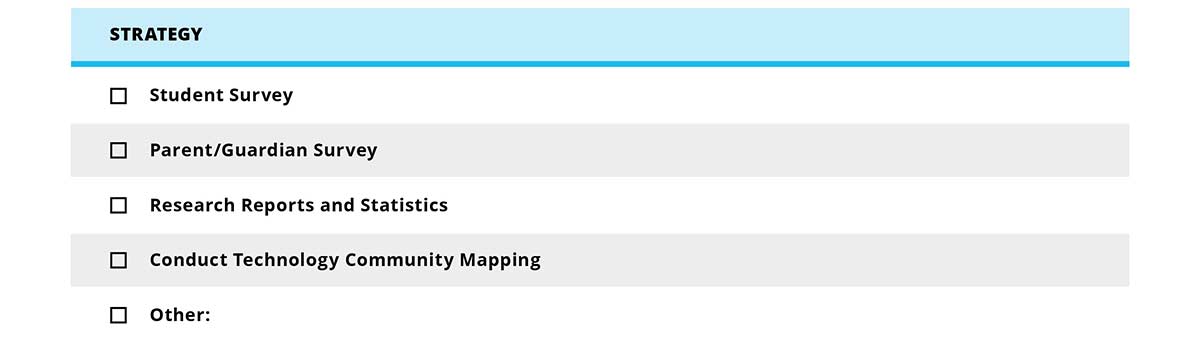
To assess the equity impacts of the digital divide for your students, incorporate the following questions into surveys you are already administering, or adapt the questions to create parent/guardian or student surveys.
DOWNLOAD SAMPLE EQUITY SURVEY QUESTIONS
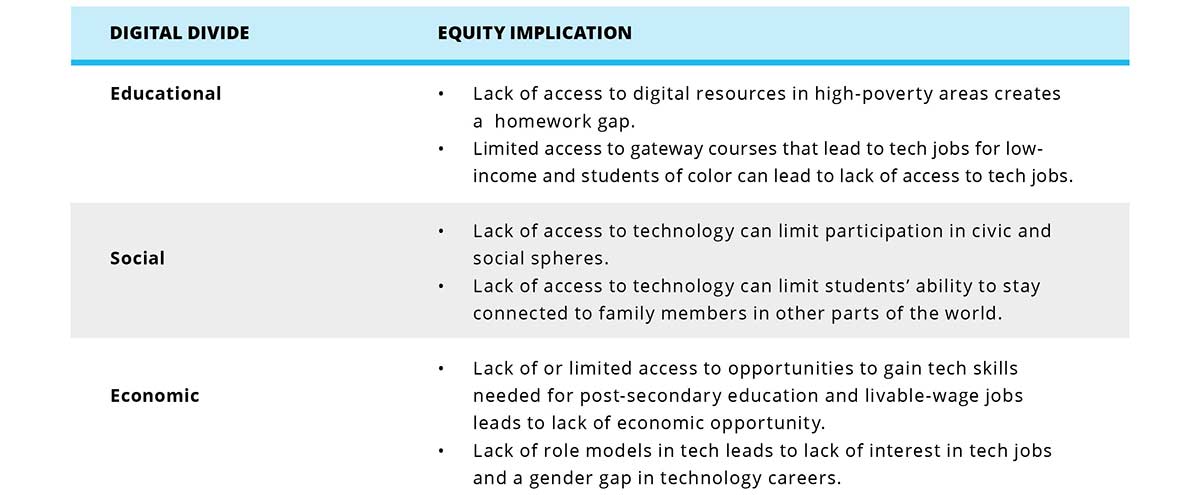
Common Equity Impacts Created by the Digital Divide
The digital divide deeply impacts opportunities for student success, especially low-income students and students of color. Following are some prevalent equity implications that stem from the digital divide.
2. Determine possible strategies.
You may not be able to immediately address all the equity impacts you identify. That is OK. Begin by identifying the priority or highest leverage issues. Following is a list of potential strategies you can implement to address some of the equity impacts listed in step 1.
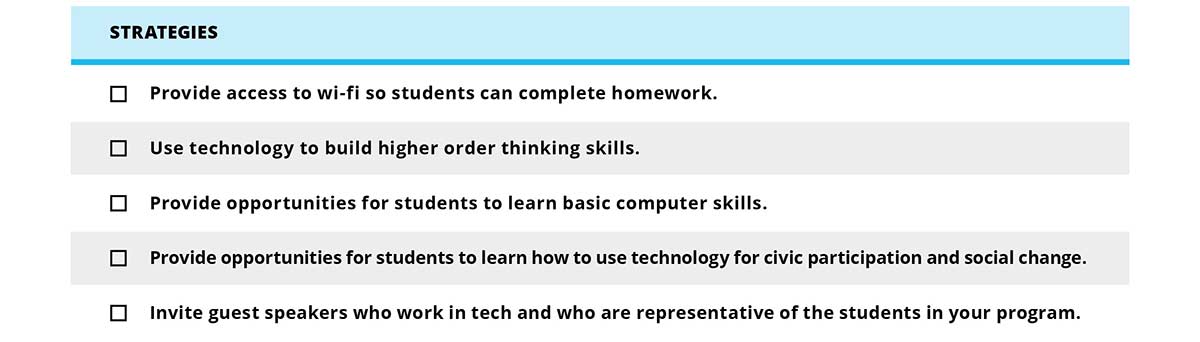
3. Implement strategies.
Now that you are clear on the equity impacts you want to address and have identified strategies to address these issues, create a plan for implementation.
DOWNLOAD EQUITY STRATEGIES IMPLEMENTATION PLAN TEMPLATE
4. Measure your success.
After you have identified the inequities you want to address and have determined which strategies you will implement, think about how you will measure success.
>>TAKE ACTION
Think about what you have read here and consider what you can do to advance equity in your program through digital learning. These questions will help you get started:
- What is the first strategy we can utilize to find out more about what inequities young people in our program face when it comes to accessing digital information and devices?
- Who do we know that is passionate about equity who can help us move forward?
>>RESOURCES
- Policy Studies Associates’ report Empowering Afterschool Professionals for Digital Learning makes a clear case for digital learning as an equity issue that can be addressed through afterschool.
- Digital Promise’s video How Education Innovation Clusters Advance Equity showcases programs and schools that use digital learning as a strategy for equity.
- The documentary Without a Net: The Digital Divide in America presents compelling stories of young people who do not have access to technology juxtaposed against stories of other students who do.
- Toward Equality of Access describes the role of public libraries in addressing the digital divide.
- SoulPancake’s Homework Gap YouTube Video is a great clip that explores what advantages (and disadvantages) students have thanks to the internet.
>>WHAT'S NEXT?
- Continue learning with the next module of the Toolkit.
- Video Training Recordings
- Share your thoughts and participate in community chats on Twitter by using the hashtag #AfterschoolTech.
Main photo courtesy of BELL | Building Educated Leaders for Life.
Embed Technology Into Your Curriculum
Thursday, 05 April 2018 00:00This module should take you 15-23 minutes to complete.
Learn how to meaningfully integrate technology into your curriculum and deepen students’ learning goals.
| REFLECT |
- How can adding technology to your programming help you respond to students' interests?
- What current activities can you strengthen by embedding technology?
- How can embedding technology strengthen the development of students’ 21st Century skills, help foster relationships, or meet program goals?
Whether you are already embedding technology into your programming or are just starting the process of doing so, this module will help you become more intentional and deepen your use of technology in your program.
>>WHAT WILL YOU LEARN?
In this module you can expect to accomplish the following:
- Understand what it means to embed technology into your current programming.
- Assess how you are currently using technology in your program, and set goals to further integrate technology to support digital learning.
- Walk through steps to intentionally embed technology into your current programming.
- Gain tips for intentionally selecting technology resources to meet your program goals, mission, and vision for digital learning.
>>WHAT DOES IT MEAN TO EMBED TECHNOLOGY INTO YOUR PROGRAMMING?
Embedding technology is weaving the devices and services you acquire seamlessly into the programming you already do. It means that you recognize technology as a tool, and a support to your program’s mission and goals, rather than an isolated activity.
>>WHY IS INTENTIONALLY EMBEDDING TECHNOLOGY IMPORTANT?
When you’re intentional, you know where you’re going and you go there with determination and resolve. Many programs offer a sampling of tech-based activities, but they may not be linked to the program’s larger goals, resulting in a watered down learning experience for students. Intentionally embed technology into your current programming to create powerful digital learning experiences for students that help bridge the digital divide.

>>HOW CAN WE EMBED TECHNOLOGY INTO OUR CURRENT PROGRAMMING?
To be intentional about your digital learning is to seek out opportunities for students to utilize technology as part of their experience in your program.
Technology Continuum
Following is a continuum of how technology is used in some afterschool programs, from low to high integration, with examples.
Your program uses technology to support homework completion.
- You already provide homework help.
- To embed technology: Provide access to computers or tablets during homework help time. Support students as they complete online research and/or complete and submit their homework online.
Your program offers some type of digital arts or digital media activity.
- You already offer weekly classes to help students develop artistic skills.
- To embed technology: Have students share their artwork on your program’s Instagram account.
Your program offers technology-specific classes/programs such as robotics or coding.
- You already offer coding.
- To embed technology: Have students use their coding skills to build an app that addresses an issue in your program or community.
Your program fosters digital citizenship.
- You already provide quick orientations to technology about how to use the internet safely before any sessions in the computer lab.
- To embed technology: Encourage children to research a current local issue that affects them online and then work together to compose and send an email to the mayor.
Your program invites speakers from the tech field that are representative of the backgrounds of the program population.
- You already help youth take part in online career assessments.
- To embed technology: Youth create LinkedIn profiles, then conduct research about the speakers prior to the presentation. After the presentation, have youth connect via LinkedIn with the speakers.
Your program helps youth build technology related skills to support their success for college readiness or success for the workforce.
- You already prepare teens for internships.
- To embed technology: Help teens use their cell phones to schedule their interviews, set up a professional email signature, and practice sending business-appropriate emails.
Your program uses technology as part of project-based learning experiences.
- You already set up groups to collaborate and track work using tools such as Google Drive or DropBox.
- To embed technology: Show students how to use a project management tool such as BaseCamp, Asana, or Trello. These tools help teach goal setting and timelines, assigning tasks and accountability, keeping track of materials created, and more.
Your program empowers youth leadership through technology use.
- You already work with a youth leadership council to advise program decisions.
- To embed technology: Have students collect recommendations from peers and other stakeholders about how to improve the program or community. Have students use a free online tool such as PollEverywhere to allow other students to vote on recommendations.
- Intergenerational Change Initiative (ICI) was created to support municipalities to promote youth participation and intergenerational policy-making. To do this, ICI works with youth councils and local municipalities to give local government the opportunity to generate policies influenced by youth voice and driven by evidence collected by teens using mobile technology. The results are an intergenerational, participatory action process that enables ongoing dialogue between youth and policymakers.
>>IN PRACTICE
|
Using Digital Learning for Social Change:
“We think it’s important to get cameras in the hands of students as soon as possible.” - Laura Scheiber, New Media Arts Program Director The Educational Video Center (EVC) is a New York City-based non-profit youth media organization dedicated to teaching media arts as a means to develop the artistic, critical literacy, and career skills of young people, while nurturing their idealism and commitment to social change. Among the many programs EVC offers, New Media Arts is an afterschool program that supports young people in exploring the field of digital media arts. The New Media Arts Program takes place in multiple educational sites and primarily serves youth who attend international schools and transfer high schools. Transfer students typically are over-age, under-credited, and off track from graduation. EVC’s student-centered and hands-on digital learning approach revitalizes students’ interest in their education and community. In this program students learn industry standard digital media skills by creating an interactive website about a social issue of relevance to them. During the first phase, students collectively choose a topic by pitching project ideas, researching social issues and debating which topic they feel most passionate about. Previous topics include immigrant rights, gentrification, mass incarceration, and teen pregnancy. Included in the website, students remix a documentary that focuses on the same social issue, but produced years earlier by EVC youth. The archival documentary serves as a springboard to dig deep into an inquiry-based process, pose new questions, and conduct web-based research on how the social issue has changed or remained the same over time. Students also conduct community interviews and, through this process, learn how to operate industry-standard equipment to capture and edit video footage. Along with the technical skills students gain through this program, they are encouraged to reflect on their creative and learning process through weekly journal prompts. Students also build their own individual websites, which serve as digital portfolios and capture their growth over time and mastery-of-skill outcomes. Finally, the program hosts a website launch party so students have the opportunity to share their final product with a live audience and to celebrate their accomplishments with family and friends. Many New Media Arts alumni have gone on to pursue a career in media arts and have attended a wide range of colleges such as SUNY Purchase and CUNY’s Hunter College, Bronx Community College, and Hostos College. |

|
Making Learning Fun:
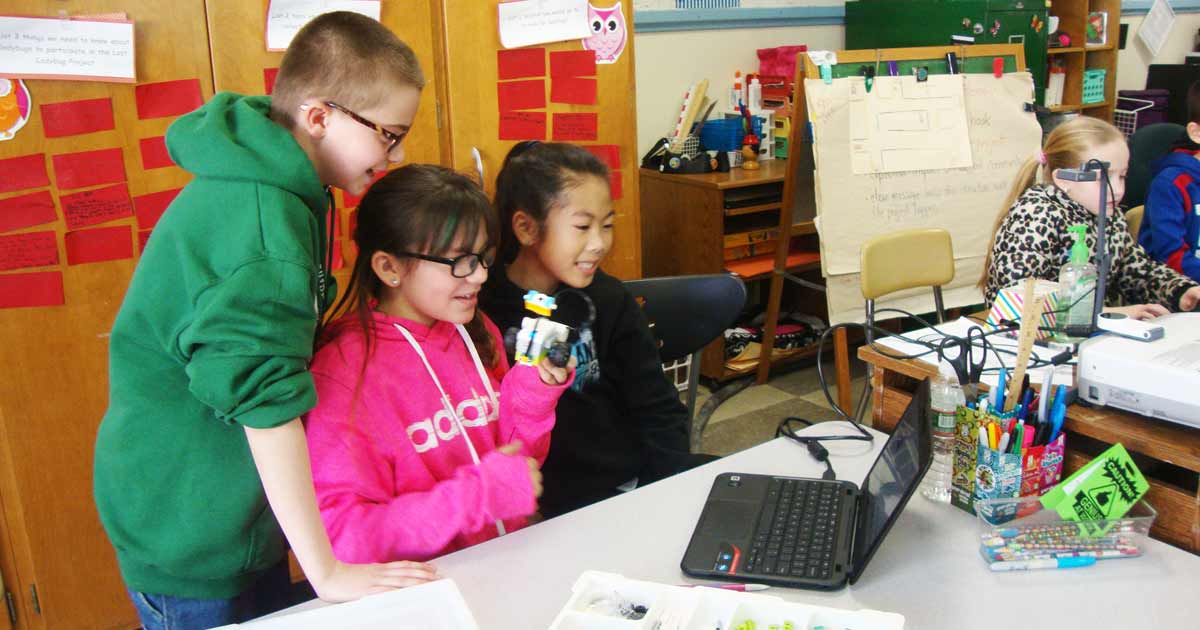
“Kids get excited about technology and it spurs the math, reading or science.” - Kim Bellio, After School Program Coordinator The Crocker Elementary School 21st Century program in Fitchburg, MA offers a wide variety of enrichment and academic activities to develop and strengthen content learning, increase motivation to learn, and develop the emerging leader in each child. In this program, students in 2nd-4th grade can increase learning and social skills through fun, hands-on activities and also receive homework support. In order to promote student growth on standardized testing, the school district implemented a STEM focus to enhance reading and math opportunities for students. This allowed the afterschool program to support students by purposefully and intentionally integrating technology to meet the learning goals of the school day. Students now incorporate Google Slides, Scratch presentations, and/or use Adobe Spark Video to prepare presentations for class assignments. Staff have noticed that the integration of this technology gets kids motivated to create and learn. The afterschool program has also integrated coding, robotics, digital photography, LEGO WeDo, and other technology and digital learning opportunities. Although students learn how to use the technology, academic learning goals are always front and center, and the technology is used as a tool to support the learning. For example, in a science lesson, in order to learn about animals and their habitats, students researched the animal’s habitats, wrote about their research, and created a robot version of their animal using LEGO WeDo Robotics. As a family engagement strategy, students bring their parents/guardians to the program to showcase the technology projects they are working on. Staff also share resources with families including free educational apps that families can download to support their children academically. After more intentional integration of technology and digital learning into their program, student test scores have risen, and students have gained self-confidence and are more interested in learning. |

>>PROCESS FOR EMBEDDING TECHNOLOGY
Think of the process for embedding technology into your programming as a journey. The following checklist includes ways to become more intentional about integrating technology into your program.
Start with the end in mind and work backward by considering your program mission and goals as well as your digital learning vision to help you choose tech-related tools or curriculum. Also consider the ages, interests, and abilities of students in your program, as well as the skills, confidence, and interests of your program staff.
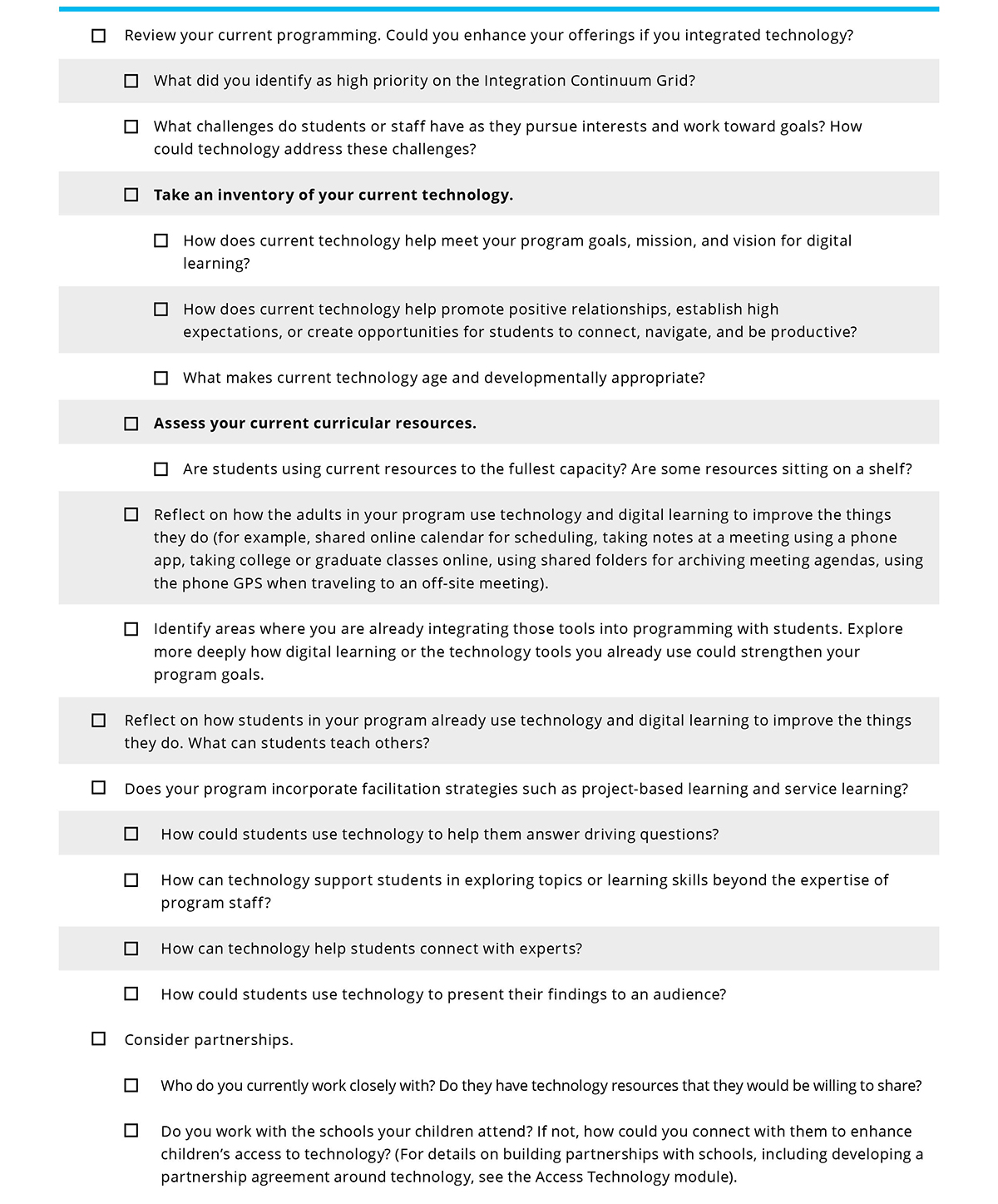
1. Assess
Think about where your program is now and where you’d like it to go. Consider technology as a tool to support students’ interests and the learning goals you have for students.
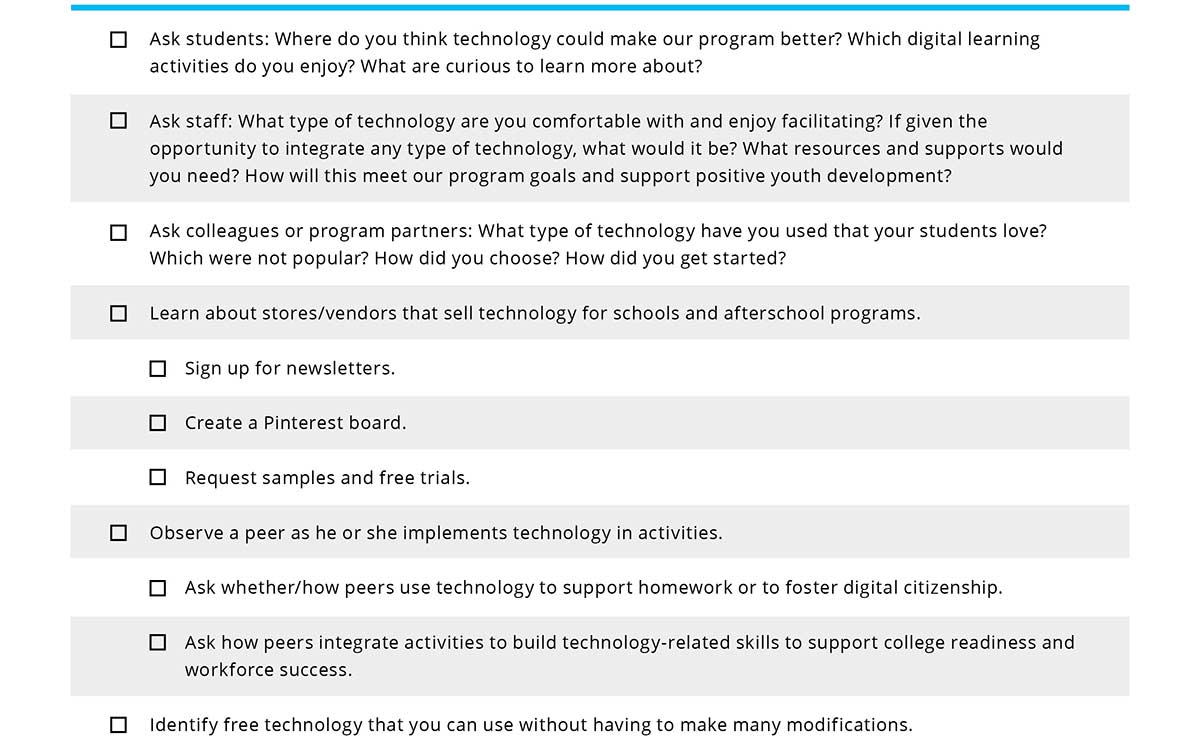
2. Explore
Get curious about the technology available and how technology could enhance your program. Collect information from stakeholders, including students.
3. Implement
After you have an idea of how you can intentionally embed technology into your program and what technology is available, try some of your ideas. You may choose to take baby steps. Pick your top priority enhancements. Clearly communicate your plans to your stakeholders. Realize that you may discontinue some activities. Stakeholders will need to know why in order to be on board as you implement new activities.
4. Review
Periodically reflect on how the new process is going and where you want to take it next. Check in with students, staff, and families to find out what they think. You may consider asking school teachers if they have noticed any changes in the ways their students use technology in the classroom, or in their homework completion rates. What tweaks should you make? What changed that you didn’t expect? Are the new activities bringing you closer to your program goals? If not, what are you willing to change? What do you need to stop? What might you start instead?
Regularly review your Integration Continuation Grid. You may want to do this informally every few months or so, and have a more formal check-in with parents, partners, and other stakeholders once a year. Have your priorities changed? Did you move any of your top priorities from one column to another? At this point, you will likely find opportunities to embed technology in many places. What will you try next?
>>TAKE ACTION
Embedding technology into your curriculum can seem daunting. Reflect on what you’ve read here and get started by asking yourself these questions.
- What is the first step to becoming more intentional about embedding technology into our program?
- Where can we add digital learning or technology in our current programming?
- What will excite the team about using technology in our current programming?
- Who will be a champion to help our program implement this technology?
>>RESOURCES
- Be Internet Awesome is an interactive curriculum that teaches kids the fundamentals of digital citizenship and safety so they can explore the online world with confidence.
- Applied Digital Skills teaches students and staff digital skills that can be used to accomplish everyday tasks, develop job readiness and manage projects.
>>WHAT'S NEXT?
- Continue learning with the next module of the Toolkit.
- Video Training Recordings
- Share your thoughts and participate in community chats on Twitter by using the hashtag #AfterschoolTech.
Main photo courtesy of National Girls Collaborative Project.
Train and Support Staff to Use Technology
Thursday, 05 April 2018 00:00This module should take you 15-22 minutes to complete.
Build your staff’s digital learning competencies through hands-on training and development.
| REFLECT |
- How comfortable and confident do staff feel using technology in programming with students?
- How ready are staff to offer leadership opportunities to students and share their own expertise as digital learning experts? What are the most important things that your staff should be able to know and do with technology to build digital learning skills?
Technology is a constantly changing field. It may feel exhausting for staff to focus on both their day-to-day responsibilities and learning new skills, apps, devices, and systems. Your focus on staff training and mentoring can help staff find ways to connect emerging and changing technology to their daily goals and work with students. In this module, you will work on building staff comfort and confidence in both using new technology and supporting youth leadership as students lead the adoption of technology in your program.
>>WHAT WILL YOU LEARN
This module will prepare you to build staff skills around digital learning. In this module you can expect to accomplish the following:
- Review digital learning competencies to understand what your team needs to know to effectively use technology in programming.
- Capitalize on your team’s expertise to build professional development into regular staff meetings.
- Build staff comfort and confidence with digital learning.
- Incorporate digital learning competencies into your hiring processes.
>>WHAT DOES IT MEAN TO BUILD PROFESSIONAL DEVELOPMENT FOR DIGITAL LEARNING?
Great professional development inspires and empowers. Professional development for digital learning allows staff to learn new material, practice skills, and reflect on experiences. Building professional development for digital learning doesn’t mean starting from scratch. This module includes a staff meeting agenda and guidelines for starting team teaching to leverage existing staff expertise.
>>WHY IS TRAINING AND SUPPORTING STAFF FOR DIGITAL LEARNING IMPORTANT?
Young people are digital natives and can often seamlessly integrate technology into daily life and projects. When your staff are open to incorporating technology and digital learning into programming, you’ll develop a modern and engaging afterschool program. In afterschool, we can model healthy usage of technology as a tool and asset to enhance lives.
Many educators have suffered through technology initiative after technology initiative in their schools and programs. As soon as orientation around new software is over another ‘one hit wonder’ takes its place. Technology is constantly shifting and growing which makes it all that more essential to put supports in place so that innovation comes directly from students and staff. Digital learning initiatives will fail if they are not supported by organization leadership. With support, staff can stay up to date on innovations that are user friendly and help to improve the afterschool learning environment. Staff support includes:
- Providing time to explore new technology.
- Maintaining a digital learning budget and building your vision.
- Listening to staff ideas and challenges and working together to resolve them.
- Train staff on new technology.
- Make the connections! Be sure staff understands how this technology or digital tool fits into the digital learning vision and enhances their ability to meet student learning goals.
- Incentivize participation in new digital learning initiatives.
>>WHAT ARE THE CRITICAL DIGITAL LEARNING COMPETENCIES TO TRAIN STAFF AROUND?
The 2017 National Education Technology Plan and other sources identified specific competencies that educators need to plan for and lead powerful digital learning approaches. Afterschool professionals need these same competencies, including the capacity to:
- Use technology for interactive learning and homework support.
- Use informal experiences to support formal learning.
- Select engaging and relevant digital content.
- Encourage higher order thinking through technology.
- Balance the staff's role and technology use in guiding learning.
- Promote digital citizenship.
- Empower students to navigate digital learning platforms.
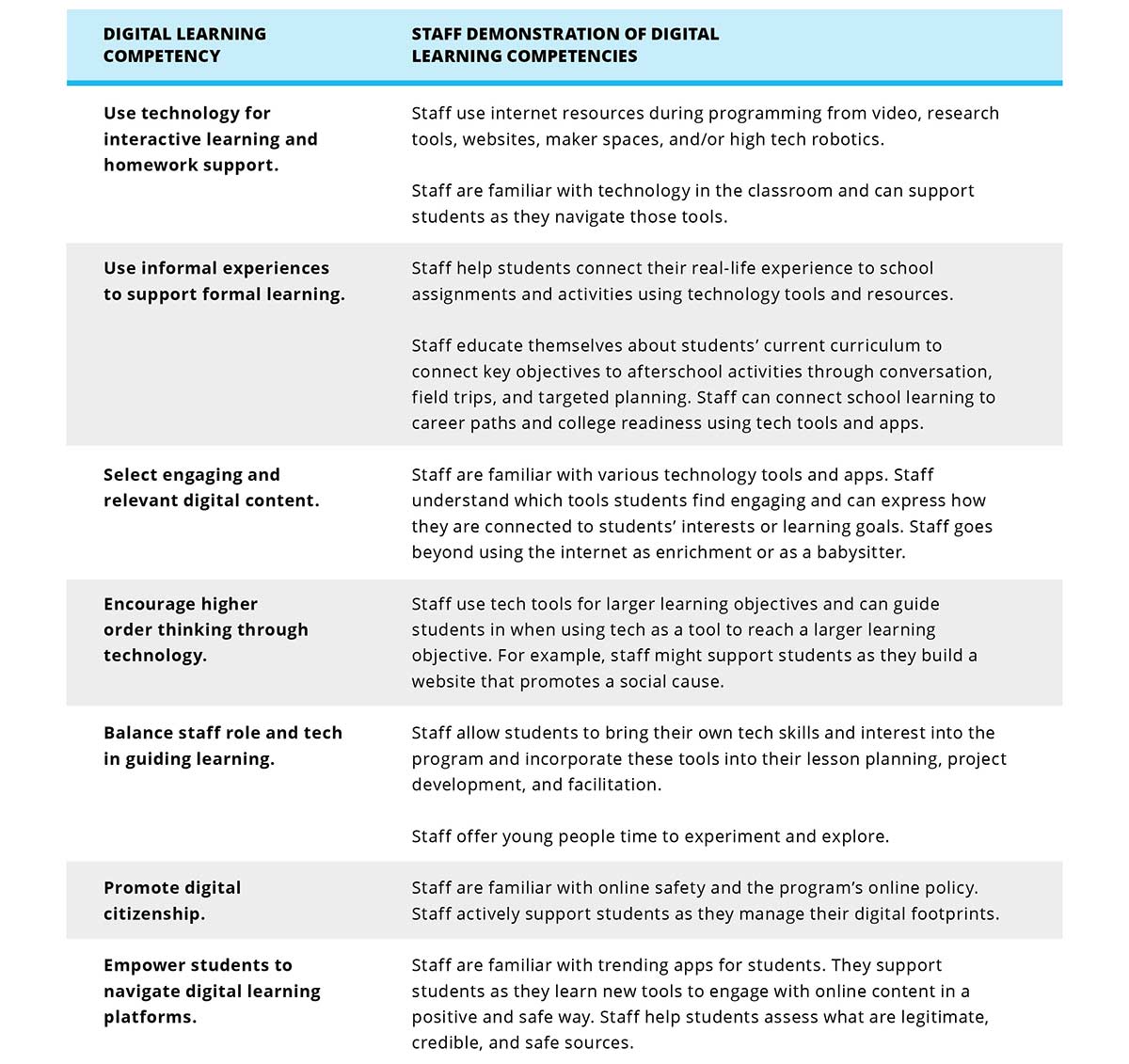
Here’s what it looks like when staff demonstrate digital learning competencies. Staff does not need to be technology experts, but they do need to grow the skills to incorporate digital learning into your program. Staff should think of themselves as digital explorers who are willing to innovate and build using tech tools to engage young learners.

>>IN PRACTICE
|
Supporting Staff to Integrate Technology:
“It’s important to have a willingness to try new things and be open technology to make sure 21st Century skills are supported in every class” -Hillary Kolos, Director of Digital Learning Based in the Bronx, DreamYard is a nationally recognized community arts organization that uses the arts, digital tools, and social justice to transform students, schools, and communities. The Art Center is an out-of-school time component of DreamYard that offers a wide range of arts programming to elementary through college-age students. DreamYard’s Digital Learning Director ensures that teaching artists are trained to integrate technology to support their medium of art and enhance creativity. Although the Digital Learning Director’s focus is to train and support teaching artists and teachers on the technical aspects of integrating digital learning tools such as Google docs, Google slides, iMovie, blogging sites, and audio and video software, teachers and teaching artists also implement strategies that enable them to be more effective with their use of technology. Teachers are encouraged to troubleshoot technology, practice and try working with new technology on their own, and implement practices during which they can draw upon students’ expertise with technology as a resource. Teachers and teaching artists not only count on the support of the Digital Learning Director, but they also have access to administrative support, student interns, and program managers who help troubleshoot technology and incorporate digital learning into their lessons. |

>>ARE YOU READY?
If the process of building digital learning professional development feels overwhelming, don’t worry. It’s OK to start small! The following steps will help you integrate digital learning into your staff meetings to build staff confidence. After professional development becomes part of your everyday program, you can expand to include formal professional training and coaching.
>>PROCESS FOR BUILDING YOUR PROGRAM'S DIGITAL LEARNING PROFESSIONAL DEVELOPMENT
In this module, you’ll gain tips to enhance your existing staff meetings and training, and you’ll build a schedule and plan to build critical digital learning competencies. Remember, in this case, you are not building professional development to build particular technical skills. Instead, you’re building a culture of exploration. Your program will benefit from hiring and supporting staff members who are willing to try new things and who know where to go for answers to technology based questions (i.e. ‘Google it!’)
Offer training around particular digital learning competencies. Bring in field experts or develop training yourself. Set the stage with the following staff meeting agenda. This meeting will help you introduce your digital vision and your plan for training staff around it.
DOWNLOAD TECH AND OUR TEAM: OUR DIGITAL LEARNING VISION AND STAFF RESPONSIBILITIES
DOWNLOAD STAFF MEETING HANDOUT: STAFF TECHNOLOGY SURVEY
Team Teaching
Afterschool is a field made up of a diverse set of practitioners with rich experiences. The most powerful professional development happens when you capitalize on the expertise of your staff and build on their skills in an applied and relevant way. Team teaching is when you allow your staff to build expertise in a particular area and then share it with the rest of the team. Staff do not have to know everything about a topic to be a great team teacher. Instead, they should have demonstrated interest in the area and a willingness to learn new skills and guide others through building new competencies.
Investing in team teaching as a professional development strategy is one way to model how you’d like staff to put youth in similar leadership positions in your program. When staff realize how great it feels to showcase their learning and skills, they may be more likely to offer opportunities for students to share what they know about technology tools within the program.
1. Find out about the expertise and interest already available within your team. Make time for staff to share their skills and coach each other.
DOWNLOAD STAFF DIGITAL LEARNING COMPETENCIES
2. Capitalize on the expertise that already exists within your team. Allow staff to coach other team members around these digital competencies. Spend 10-20 minutes of the next few staff meetings to allow staff to teach the group. Complete the following competency chart to create a plan for staff development.
DOWNLOAD IDENTIFYING STAFF DIGITAL LEARNING COMPETENCIES
3. Build a teach-back plan with staff who will share their skills or share what they’ve learned about the competency. Use this guide to build your plan.
DOWNLOAD STAFF MEETING PLANNING GUIDE
4. What’s Next?
Take another look at the Digital Learning Competencies and determine which skills can’t be addressed in staff meetings. Explore other ways to build those skills. Decide you will charge with building these skills and work with them to determine how they will gain this knowledge and bring it back to the program and staff.
DOWNLOAD DIGITAL LEARNING COMPETENCIES

>>CONSIDERATIONS AND RESOURCES FOR HIRING STAFF INTERESTED IN TECH
It is not realistic to hire staff who know everything about the latest technology. However, it is possible to hire staff with the interest and aptitude to keep up with this dynamic and evolving field. Within your current hiring criteria, look to bring on new staff who will work to connect emerging and changing technology to their daily goals and work with students. (Note: If you want to establish clear hiring criteria for your program, review the National Afterschool Association (NAA) Core Knowledge and Competencies.)
Hiring staff who are interested in digital learning and technology will ensure that your team is working to incorporate technology into daily programming. Individuals who are interested and passionate about technology will be motivated to stay up to date on the changing field enabling your program to offer rich experiences for students who are engaged by new technology.
Afterschool program staff are increasingly asked to build technology into programs on the cheap. Target your hiring to find creative people who can utilize free or inexpensive and readily available technology resources to enhance digital learning in your program. Modify your recruiting process around the digital learning competencies you are targeting.
Build Compelling Job Descriptions: Be sure that the skills you are looking for are clearly listed in the job description. Review the following chart for examples of how you might articulate these skill requirements. Edit both the job overview and requirements to incorporate these skills into your standard job descriptions.
|
1. Include the competencies in the role description section of the job posting. For example: This role requires a professional who has experience:
2. In the requirements section, describe the level of experience you’d like a candidate to have. Write these requirements in a way that focuses your interest on the work your program is committed to doing. For example: Job Requirements:
|
Get Proof: Ask candidates to demonstrate their technical skills as a part of the initial screening. This is especially important if you have a large digital learning or tech component to your program. Use the following prompts as part of a comprehensive application process that shows tangible proof of capacity and skills.
|
In the Interview: Ask targeted questions about a candidate’s experience with technology in order to learn about their capacity to implement digital learning best practices in your program. Think about your own personalized digital learning goals when selecting questions to use. Review the following list of sample questions.
|
Sample Interview Questions Get the most out of your interview with these questions. Choose a few to add to your typical interview questions. General questions to illustrate digital learning capacity:
|
DOWNLOAD INTERVIEW QUESTIONS SPECIFIC TO DIGITAL LEARNING COMPETENCIES
Model Technology Skills: Remember that you are not only looking for a great candidate, but you also want to show the candidate that technology is a priority for your program. Host a virtual interview using free/inexpensive virtual meeting tools such as Google Hangouts or Zoom.
Consider Compensation: In many fields, staff with special skills are compensated for those skills. Look at your budget and determine whether a candidate proficient in digital learning could earn a higher compensation than other staff. Consider enhancing their job requirements to include mentoring others as a part of their enhanced job description.
>>TAKE ACTION
Take what you have learned in this module and get started implementing professional development for your program. Use the following questions to jumpstart the process.
- What will get my team excited about sharing their digital learning expertise?
- Who can I identify as a champion to help with professional development?
- When can I schedule my first professional development staff meeting?
>>RESOURCES
- Google for Education’s Training Center offers self-paced training for educators who want to learn basic and advanced strategies for integrating Google into instructional practice.
- Mozilla’s Core Web Literacy Curriculum provides facilitation guides leaders can implement with staff to teach basics of how to read, write, and participate on the web.
- Click 2 Science offers a 30-Minute Staff Development meeting for professionals to explore available technology.
- Front line staff can get more comfortable using technology through the facilitated, online professional development of Maine Mathematics and Science Alliance’s Afterschool Coaching for Reflective Educators (ACRES) training.
- PBS Learning Media has coursework on maximizing digital learning in your classroom or program. There are videos, courses and trainings available.
- CODE.org offers professional development for staff interested in learning how to teach students how to code.
- Coursera has free college level courses available for staff to learn all about the latest trends and techniques in digital learning. Courses change each semester so check back a couple of times a year.
>>WHAT'S NEXT?
- Continue learning with the next module of the Toolkit.
- Video Training Recordings
- Share your thoughts and participate in community chats on Twitter by using the hashtag #AfterschoolTech.
Promote Digital Learning in Afterschool
Thursday, 05 April 2018 00:00This module should take you 18-24 minutes to complete.
Create a communication plan in order to promote and gain support for digital learning in your afterschool program across varied audiences.
| REFLECT |
- What is our program’s current communication plan?
- How can promoting digital learning support our program?
- Why do we want to promote digital learning and technology in our program?
Your program may already have a well-thought-out communication plan that includes messaging tailored to different audiences. If this is the case, creating a plan to promote digital learning in your program can not only help you gain support for digital learning, but it may also help create more support for and interest in your program!
>>WHAT WILL YOU LEARN?
This module will help you create or improve your messaging about digital learning in your program for different audiences so you can more effectively promote how your program incorporates digital learning and uses technology. In this module, you can expect to accomplish the following:
- Understand the importance of creating an effective communication plan to promote digital learning in your program.
- Learn the process for incorporating language about digital learning and technology into your current communication plan.
- Identify your audiences and begin to tailor your message for each audience.
>>WHAT DOES IT MEAN TO PROMOTE DIGITAL LEARNING?
Promoting digital learning in or about your program means having clear and consistent messaging tailored to different audiences about how you are integrating digital learning and using technology in your program. It may also mean having a clear way to communicate why you would like to begin to incorporate digital learning into your program if you are not already doing so.
>>WHY IS PROMOTING DIGITAL LEARNING IN MY PROGRAM IMPORTANT?
Having a well-thought-out communication plan about digital learning and technology in your program can help you:
- Secure access to devices, space, staff, or funding.
- Recruit more students into your program.
- Get additional support from school-day and/or community partners.
- Get staff on the same page with a unified message about digital learning and technology.
- Celebrate and elevate your program’s accomplishments around incorporating digital learning.
>>SAMPLE LANGUAGE TO USE REGARDING TECHNOLOGY AND DIGITAL LEARNING IN YOUR PROGRAM
When starting to think about the language to include about technology and digital learning, it can be useful to create an elevator pitch. An elevator pitch is a short persuasive speech that you can use to get support for the way you incorporate technology and implement digital learning in your program. The idea is that your message is clear, concise and can be spoken in 30 seconds or less—the time it takes for your listener to ride in the elevator with you.
DOWNLOAD ELEVATOR PITCH COMPONENTS TEMPLATE
Practice your elevator pitch and have staff practice, too. Make it fun by having a contest for who can memorize it the best or say it the fastest. It’s important that everyone can give the elevator pitch with ease—because you never know who you might meet! It could be someone who wants to support your program.

>>IN PRACTICE
|
Clarifying Goals and Messaging:
Since 2001, the Long Beach YMCA Youth Institute (YI) has been improving the lives and academic outcomes of adolescents in the Long Beach, CA community. The Youth Institute uses technology as an integral mechanism for promoting positive youth development and developing pathways to post-secondary education and career readiness of low-income, culturally diverse urban high school youth. Youth Institute alumni have well-documented success stories. This program is often cited in grant applications for technology programs and the founder, Bob Cabeza, frequently uses opportunities as keynote speaker at educational conferences to elevate the visibility of the program. A large part of this program’s success can be attributed to clear and careful planning. As a requirement of an early partnership with Apple, YI staff had to create a pitch session on how the program would be marketed to parents and potential partners. The YI staff and representatives from Apple met over the course of a two-day retreat to plan their pitch and business model. It took approximately a dozen revisions until they narrowed their focus into a streamlined narrative that quickly got to the point of their mission. Their “pitch” is as follows. “The YMCA Youth Institute is a youth development program that engages low income diverse youth with cutting edge technology connecting what they learn to social, emotional, academic and workforce skills. We help youth re-engage to love learning and challenge the academic environment. We make them makers of movies, graphic arts, music and products.” Because of the popularity of this program, the biggest advocate for the Youth Institute is the student body itself. In many ways, students have their own pitch. The highest recruitment for new members comes from friends who are already in the program. There is intentionality with which students are accepted into the program. Students must receive recommendations from their peers, school counselors, and teachers. In addition, there is planned racial and ethnic diversity, and because of a disparity in gender throughout the tech industry, student recruitment is equally female and male. For recruiting partnerships, however, the YI staff still rely on their trusted elevator pitch. By being able to quickly get to the point, they have developed partnerships with 15 foundations. These partnerships vary from general funding initiatives to small, specific projects. Clear and concise goals, objectives, and data-proven methods all work toward keeping this program both up and running and evolving. Mr. Cabeza’s advice for those looking to bring more technology into their programs is to “think big, buy small.” He suggests to have an intended outcome that is about more than technology and bring the technology in gradually, teaching what is reasonable and immediately usable, while remembering that your goal is about students more than it is about technology. |

|
Using an Elevator Pitch Toolkit for Multiple Scenarios:
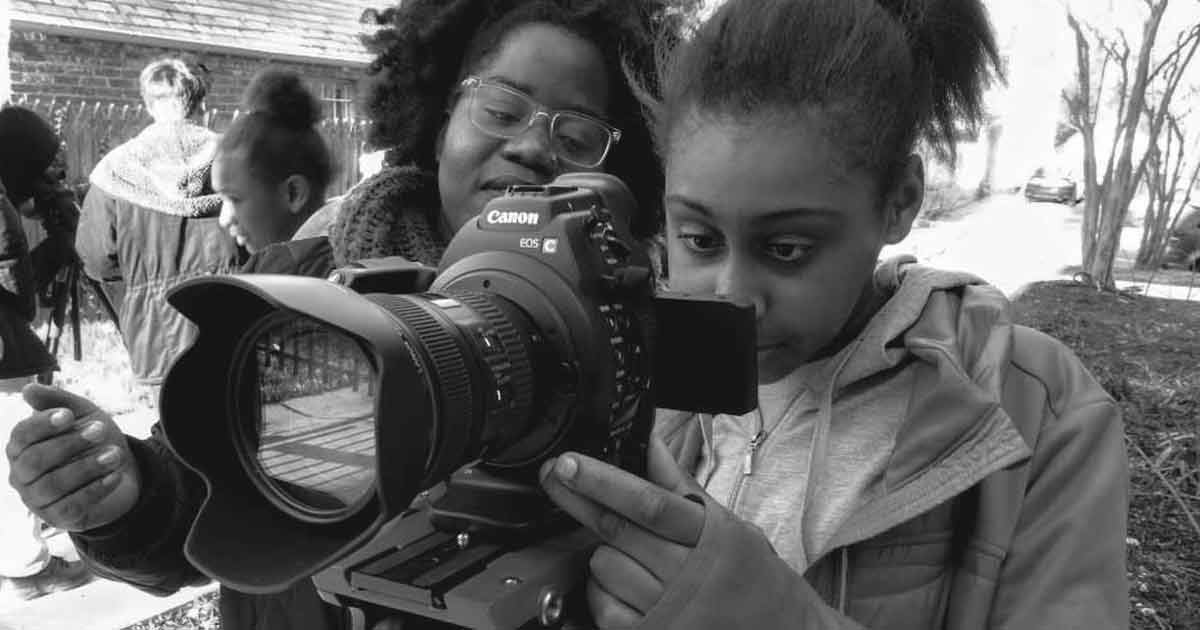
Photo credit: Wide Angle Youth Media Wide Angle Youth Media (WAYM) has produced hundreds of media projects with students since their start in 2000. Their mission grew organically, evolving to meet the needs of the Baltimore, MD community. What started as a way to help young people tell their stories became a way to expose teenagers to new career possibilities in technology fields with training and paths to certification, to assist older students with the transition to the workforce or college, and to continue with broader goals such as building communication skills, providing adult mentoring, and of course, storytelling. At its heart, WAYM is about storytelling. Their elevator pitch is a story told in many ways by many people about why this program is special. Staff, students, board members, parents, mentors, etc., all have something to say about Wide Angle. To help these varied speakers communicate with diverse audiences, the Marketing and Communications department, along with staff and board members, developed an Elevator Pitch toolkit instead of a singular elevator pitch. Usually, WAYM lets student work speak for itself, but sometimes a few quick words can open doors to sharing that work. Their toolkit asks the person giving the pitch to think about a few core questions and how they would tailor them to fit a particular audience. First, identify the audience and what the goals are in approaching the audience. Then, put enthusiasm to work and tell the story of your involvement. Explain what the organization does by becoming familiar with the mission statement. Highlight the successes. What are the selling points? Circle back to your story of involvement, and tie everything together. Answer any follow-up questions and be prepared to collect a business card or get contact information. Finally, express gratitude and share information and connections. The WAYM Elevator Pitch toolkit breaks down these questions. When asked what sorts of partnerships this style of pitch has lead to, Sheila Wells, the Development and Communications Director, responded, “All kinds! Pitches have led us to meet amazing young people who have later joined our programs, helped to recruit volunteers, staff, donors, consultants, production clients, board members, and community partners for future collaborations. It has also helped connect us to distribution outlets for our youth-produced media, and university partners to help provide support in college and career readiness for our youth.”
|

>>ARE YOU READY?
If you have a communication plan to promote and/or garner support for your program or organization, then you are probably already familiar with the following steps. This process will help you hone in on specific language to promote your efforts around integrating digital learning and utilizing technology.
>>PROCESS FOR PROMOTING DIGITAL LEARNING
DOWNLOAD PROCESS FOR PROMOTING DIGITAL LEARNING
1. Establish your purpose and goals.
Ask yourself:
- What do we want to accomplish with our communication about technology and digital learning?
- What kind of support are we looking for and from whom?
By reflecting on these questions, you will notice that you may have different goals for different audiences. This is OK. These goals will guide you in crafting the best message for each audience. For example, you may be seeking financial support from businesses and foundations in order to purchase devices. Perhaps you are looking for tech-savvy volunteers to help incorporate digital learning activities into your program’s offerings. As you establish your goals for promoting digital learning, be clear about the goals you have for different audiences. Clear goals will help you create specific language for each audience.
2. Identify your audience.
Think about who you want to reach and why. This will help you determine what information is most relevant, what tone to use, and the most effective medium for communication.
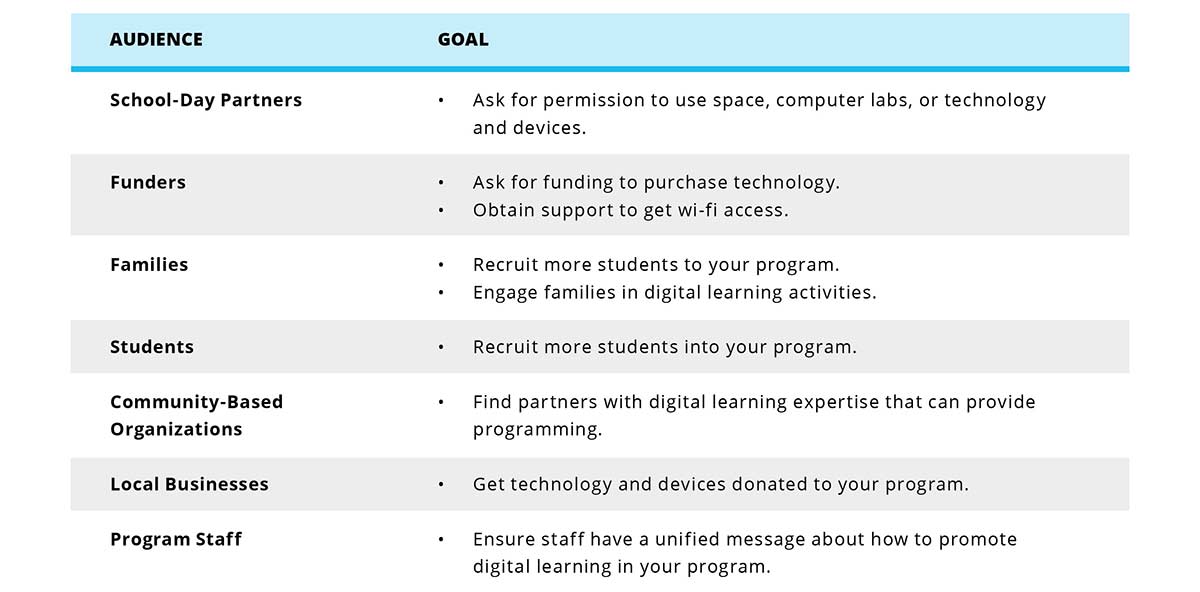
The following chart shows examples of audiences you may want to reach and the goal for promoting digital learning in your program to that audience.
3. Gather research, data, and information.
After you are clear about the audience you want to reach, you can determine what information they need. For example, you may need to present data to make a case about funding technology access in your school/program/community. Don’t just think about collecting data and research. Also consider the anecdotal successes you have had with digital learning and/or potential resources you could leverage. Combining qualitative and quantitative data is a powerful way to demonstrate evidence of success! As our friends at Digital Promise say: Evidence= Data + Story
If you are trying to reach families who may be apprehensive about technology, consider highlighting the importance of 21st Century skills for college readiness and workforce success. Also, include ways you use technology to support positive youth development practices.
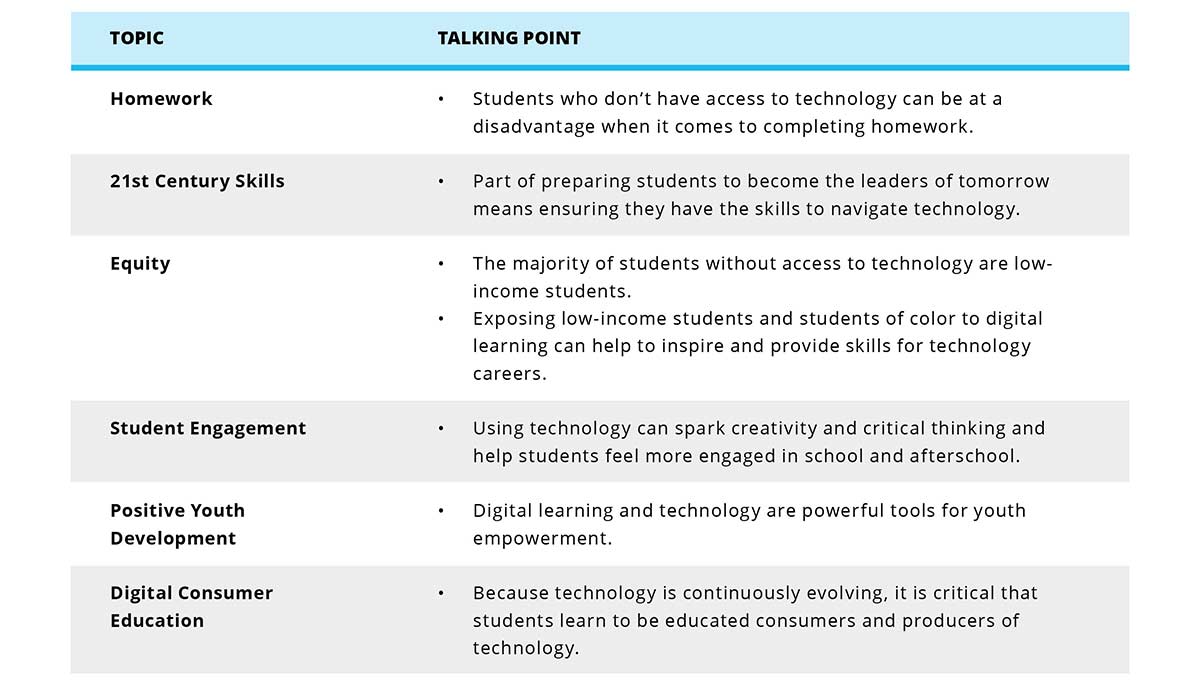
As you begin to craft your communication plan around digital learning for your program, here are some talking points you may find useful.
4. Create your message.
Now that you have a goal, know your target audience, and have compiled talking points and research points, it’s time to create your message. Your message should be different from your elevator pitch. Your message should include all the talking points you want to get across and should not be restricted by time or length.
As you craft your message, realize that some people have a negative reaction to the idea of students interacting with technology. Students and technology can be perceived as a distraction or as something that may lead to cyber bullying. While these concerns are valid, it is important to emphasize the skill-building aspect of your work and stress the fact that the technology use and digital learning that takes place in your program is conducted in a safe and supportive environment.
5. Determine how you will deliver your message.
In order to determine the avenues you will take to deliver your message, ask yourself the following questions:
- Should we set up in-person meetings?
- What social media platform would be most effective to deliver our message? Remember that infusing some levity and youth voice into your communication is also great. So, let your inner poet come out! Ask youth to give their insights about technology and digital learning and write a post about it. Post photos of your digital learning programming in action. Use social media to continue to engage your audiences and help them understand why digital learning is so important to your students.
- Should we organize family or community meetings?
6. Assess how your message is being received.
After your communication plan to promote digital learning in your program is well underway, it is important to assess whether you are reaching your audience with the message you created. Evaluate how well you are meeting your goals. This will help you determine whether you need to tweak your message.
Guiding Questions to Evaluate How Your Message Is Being Received
- Have we secured more funding for devices or other technology?
- Have any new opportunities for the program surfaced since we launched our new communication efforts?
- Has student recruitment increased as a result of new messaging around digital learning and technology?
- Have we developed new partnerships as a result of messaging about technology and digital learning?
- Have we obtained more or better access to technology and digital learning from our school day, community, or business partners as a result of our messaging about digital learning and technology?
>>TAKE ACTION
Consider what you have learned in this module, and start planning your communication to promote digital learning. Use the following questions to get you started.
- What can we do as a first step to start promoting digital learning in our program?
- Who possesses communications skills to support our program in creating a digital learning and technology communication plan?
- How can my team be meaningfully involved in this process?
>>RESOURCES
- The Afterschool Alliance offers tools to create a comprehensive communication strategy for your afterschool program.
- Afterschool STEM Hub was developed by the Afterschool Alliance and the FrameWorks Institute to specifically support afterschool programs in communicating about STEM.
>>WHAT'S NEXT?
- Continue learning with the next module of the Toolkit.
- Video Training Recordings
- Share your thoughts and participate in community chats on Twitter by using the hashtag #AfterschoolTech.
Get Started with Technology in Your Program
Thursday, 05 April 2018 00:00This module should take you 15-22 minutes to complete.
Afterschool programs have an important role in bridging the digital divide. Learn how this toolkit will help you make a difference for the students your program serves.
| REFLECT |
- What are your attitudes about integrating technology into your afterschool programming? Why?
- How is your program currently using technology?
- What are you hoping to learn and do after reading this Afterschool Tech Toolkit and participating in the training?
As John Dewey said, “You cannot teach today the same way you did yesterday to prepare students for tomorrow.” You know technology is here to stay, but you may not have considered technology’s place in afterschool.
Welcome to the Afterschool Tech Toolkit! Here you will find resources and actions to enhance your current programming so you can provide students with powerful access to technology outside of the school day. You will also be able to access hands-on training that will help you take what you’ve read and put it into action.
>>WHAT WILL YOU LEARN?
This module will help you deepen your thinking and plan for integrating technology into your programming. In this module, you can expect to accomplish the following:
- Learn why incorporating technology into your afterschool program is important for the students you serve.
- Understand how to use this toolkit to help you offer access to high-quality digital learning experiences that are fueled by technology.

>>WHY IS IT IMPORTANT TO PROVIDE ACCESS TO TECHNOLOGY?
You believe in equity! It may seem that technology is everywhere, that all students have smartphones, and that screen time should be limited. While that may be the case for many students, there are other students (about 5 million actually) who don’t have internet access when they are not in school.
Equity means closing the digital divide. Students who have access to technology and high-quality digital learning experiences during the afterschool hours have more opportunities than students who don’t have access. This is an equity gap called the digital divide.
Access alone is not enough to bridge the digital divide. It matters what students do with technology. That’s where digital learning comes in.
When you intentionally integrate technology into your programming, you empower students to access tools and information in ways that support and engage them, expose them to new ideas and experiences, and develop 21st Century skills.
Think about the goals you have for the students your program serves. When you offer access to technology and the internet as part of your program’s learning experiences, you can help all students gain:
- Information
- Knowledge is power! When students know how to find information and identify reputable information sources, they become critical users of information.
- Influence
- Being able to communicate using technology through blogs, websites, tweets, and other posts is a critical skill for students to represent themselves and influencing others.
- Being able to communicate using technology through blogs, websites, tweets, and other posts is a critical skill for students to represent themselves and influencing others.
- Civic Participation
- During the 2008 election, over half of the adult population went online to get election news or participate directly. You can support students in their understanding of civic responsibility and help them participate online.
- During the 2008 election, over half of the adult population went online to get election news or participate directly. You can support students in their understanding of civic responsibility and help them participate online.
- Cultural Identity and Family Connections
- Students can develop and embrace cultural identities when they maintain positive connections with family members who live far away.
- Students can develop and embrace cultural identities when they maintain positive connections with family members who live far away.
- Career and College Preparation
- When students have access to technology to complete or submit their homework, they are less likely to fall behind.
- Students also can research and apply to jobs and colleges online.
- Post Secondary Success
- Livable wage jobs of the future, whether in the tech industry or elsewhere, will require the ability to use technology for various purposes
What strengths do afterschool professionals bring to help bridge the digital divide?
For some, the idea of integrating technology may feel overwhelming, but consider this: Technology is not another thing you have to do. It’s not an add-on to your current programming. Technology is a tool to be embedded within your current programming to help you better support students’ learning and growth.
You already bring a lot of strengths to deliver these critical resources.
- You serve a lot of students! Each year, more than 10 million elementary, middle, and high school students participate in afterschool programs that expand learning opportunities in school- and community-based settings.
- You support school-day learning. Afterschool professionals play an especially important role in supporting learning for low-income students by providing homework help, opportunities for STEM learning, reading, and writing.
- You foster 21st Century skills. To be effective citizens, workers, and leaders in society, students also need practice with critical thinking, communication, collaboration, and working creatively.
- You use positive youth development. Afterschool professionals and youth workers are skilled at using a wide range of tools to build relationships, set high expectations, and make sure youth experience many types of age-appropriate opportunities.
When you look at what you are already doing and then intentionally integrate technology into your programming, you can play an important role in bridging the digital divide.
“Our program has a real focus and passion for digital learning. When our students go on to middle school and specialized high schools, they’re ready and they’re equipped equally to their peers who might come from more privileged backgrounds.”
—Eric Gurna, President and CEO, LA’s BEST AfterSchool Enrichment Program
>>HOW WILL THIS TOOLKIT HELP YOU BRIDGE THE DIGITAL DIVIDE?
To bridge the digital divide, you need to be able to:
- Provide access to technology.
- Provide high-quality digital learning experiences.
No matter where you are in the process of integrating technology, this toolkit will help you move forward. You will reflect on your current practices, envision how digital learning fits into your program and consider how you can use digital learning to support equity. You will make a plan to embed technology into your current curriculum and then identify how to access devices and tools you need in order to offer those learning experiences. The toolkit will help you determine how to communicate about digital learning with partners and funders and train your staff to use technology afterschool.
>>WHO CAN USE THE AFTERSCHOOL TECH TOOLKIT AND TRAININGS?
This online toolkit and trainings were developed for professionals who currently lead or oversee out-of-school time programming in various settings including schools, community-based organizations, private organizations, churches, libraries, and homeless shelters.
If you represent a school district or school day classroom, you can still use this toolkit! It will help you determine how to offer meaningful digital learning experiences to all students. The language used in this toolkit may be different than what you’re used to.
The language primarily used in this toolkit is:
- Afterschool which includes out-of-school time, summer programming, expanded and extended learning opportunities as well as other programming that occurs beyond the typical school day.
- Students by whom we mean children, youth, young people and opportunity youth--the people your program serves.
- Afterschool professionals and staff which includes anyone working in your program paid, volunteer, full time, part time, etc.
By talking to a wide range of afterschool, school day and other youth-serving professionals and reviewing the research, we identified a set of important topics to help prepare you to offer meaningful digital learning. Each module of the Afterschool Tech Toolkit and training addresses those topics by providing strategies and resources to help you feel competent, confident, and comfortable when embedding technology into your current programming.
How Is the Afterschool Tech Toolkit Organized?
Every module follows the same format:
- Reflect: Provides an opportunity to reflect on your own practice and consider the strategy discussed in the module
- What Will You Learn?: Sets the objectives for the module and lets you know what you should expect to accomplish by reading this module
- What Does It Mean?: Defines the tool or strategy in the module
- Why Is It Important?: Describes why this strategy is important in your process of integrating technology
- In Practice: Vignettes of actual programs across various settings that are implementing the strategy
- Are you ready?: Acknowledges where you are in the process of integrating technology and sets an aspiration to move toward
- Process: Offers the steps you can take and tools you can use to develop this strategy in your own program
- Take Action: Gives you a few considerations to help you implement the strategy right now
- Resources: Provides links to a few high-quality resources that will help you go further with the strategy
- What’s Next?: Asks for your feedback, directs you to hands-on training and helps you move to the next module
Every module also has a corresponding training to help you take what you’ve read and put it into practice. Sign up for training here.
>>WHAT ARE YOUR CURRENT TECHNOLOGY PRACTICES?
Before you begin reading the strategies presented in the Afterschool Tech Toolkit or taking any of the trainings, consider your current technology practices. Having a good sense of what you are already doing will help you determine areas you can strengthen and identify areas to grow toward.

>>TIPS TO GET THE MOST OF THE TOOLKIT
To get the most of this toolkit, we have a few recommendations:
- Get your friends onboard. Assembling a team to share in the responsibility (and fun!) of integrating technology is a good idea. A well-rounded team could include school day teachers, youth, program alumni, community partners, and families/caregivers. The team can provide critical feedback, help problem-solve, and provide a wide range of important perspectives.
- Start with the module Set a Shared Vision for Digital Learning so you are clear on how technology fits in your program. After that, read the strategies that seem most relevant to you right now.
- Be OK with where you are, and take small steps forward. Depending on where your program is with technology integration, some ideas may seem overwhelming. Acknowledge your discomfort, then determine the small steps you can take to move forward.
- Keep your positive youth development approach. You do not need to know everything about technology before you implement it. Remember to empower and include your students as partners as you figure out how to integrate digital learning into your program. Continue to support students as they develop their voices, express their interests, experience identity formation, explore social justice, and dream about and plan for their futures, and seek ways to embed technology into these activities.
>>RESOURCES
- Read more about how afterschool professionals can support digital learning in the report, Empowering Afterschool Professionals for Digital Learning.
- If you do not currently have an afterschool program, but would like to start one please review the tips in How to Start an Afterschool Program by the National Afterschool Association and Ohio Afterschool Network.
- If you are offering afterschool programming, MANY’s guide How Youth Services Programs Stay Relevant and Sustainable, offers clear actionable steps to be strategic and relevant.
>>TAKE ACTION
Take what you’ve read in this module and get started on the next module that makes the most sense for you. Use the following questions to help.
- What topics did my self-survey indicate I should build upon or address?
- Who on my team may also want to review this toolkit?
- When can I schedule time to read another module?
>>WHAT'S NEXT?
- Continue learning with the next module of the Toolkit.
- Video Training Recordings
- Share your thoughts and participate in community chats on Twitter by using the hashtag #AfterschoolTech.
Set a Shared Vision for Digital Learning
Thursday, 15 February 2018 00:00This module should take you 18-25 minutes to complete.
Set a vision for digital learning in your afterschool program by considering how technology can support your program’s mission and goals.
| REFLECT |
- What is our afterschool program currently doing with technology?
- What does our program want to do with technology?
- How does technology support our overall program goals?
- Why is our program using technology?
If your program already offers tech-related activities for students, that’s great! By creating a shared vision for digital learning, you can allow all partners—afterschool staff, school, community, parents and caregivers, and students—to be on the same page about how you use technology to support your broader program goals.
>>WHAT WILL YOU LEARN?
This section will prepare you to create or refine your program’s vision for digital learning. In this section, you can expect to accomplish the following:
- Understand the importance of creating a shared vision for digital learning.
- Review the process for creating a shared vision.
- Determine the first step to set a shared vision for digital learning in your program.
>>WHY IS A SHARED VISION FOR DIGITAL LEARNING IMPORTANT?
Your program’s vision can help keep your program’s technology use focused and meaningful. Use your program’s vision as a guidepost to:
- Make intentional decisions about digital learning curricula or activities.
- Set explicit expectations with students before putting devices in their hands.
- Train, develop and hire staff with the knowledge and skills to support your digital learning vision.
- Sustain strong digital learning in your program when staff or partners change.
- Identify partners and community collaborators who share your vision.
- Make a plan to invest in technology.
- Determine what your program measures and reports on when it comes to technology.
>>EXAMPLES OF DIGITAL LEARNING VISION STATEMENTS
Following are sample digital learning vision statements. Use these examples as a starting point. Then, learn how to write your own vision statement.
Sample Digital Learning Vision I: LA’s BEST
We envision equal access to evolving technologies for students and staff throughout LA’s BEST to enrich learning experiences, build 21st Century skills, and promote lifelong learning.
Sample Digital Learning Vision II: Beacon House
Through its technology-enabled afterschool programs, Beacon House will empower learners to have the confidence to innovate and creatively solve problems in school, work, and life.
Sample Digital Learning Vision III: Community-Based Program
Technology offers young people an avenue to succeed as citizens in a global society. Technology can improve communication, enhance thinking skills, make instruction more efficient and effective, and help students develop life skills critical to success. We envision a program that works to close the technology gap in low-income communities and provides learners with the skills and competencies necessary for problem solving and lifelong learning. Our program incorporates technology in order to support and facilitate academic success, support homework, engage youth in citizenship, build relationships, and create opportunities for students to connect, navigate, and be productive.
Sample Digital Learning Vision IV: School District Program
We believe that technology is a tool to facilitate learning, expand instructional possibilities, and increase the capacity of staff and students. We make the following commitments to our stakeholders including the district, staff, students, parents, and partners:
- We will use technology to enhance and expand students’ academic achievement, especially in reading, writing, math, and science.
- Our classrooms and media center will be technology-rich, and technology will be used to meet the needs of students with various learning styles.
- Technology will be used to advance communication among and between our staff, students, and parents to deepen 21st Century skills including collaboration, critical thinking, and effective communication.
- Through the use of technology, staff and students will expand their access to tool, networks, and resources.
- Staff will be supported and trained in the use of new technologies.

>>ARE YOU READY?
If the process of creating a shared digital learning vision statement feels overwhelming, don’t worry. It’s OK to start small! If you already have experience setting a shared vision or have begun conversations about digital learning, jump in! You’ll see exactly where you and your organization fit in the vision planning process.
>>PROCESS FOR SETTING A VISION FOR DIGITAL LEARNING
1) Clearly articulate your program goals.
Ask:
- What do we want students to know or be able to do?
- How can technology support our goals?
- How can technology enhance positive youth development?
For example, if helping students complete homework is a program goal, include how your program will use technology to meet this goal as part of your digital learning vision. If you want to increase youth voice, partner with students to brainstorm ideas and give input on technology resources needed. When you establish a shared vision for digital learning in your program, make sure technology is used to build relationships and set high expectations and that students experience age-appropriate opportunities.
DOWNLOAD PROCESS FOR SETTING A VISION CHECKLIST
2) Identify partners.
Build a team to share the responsibility (and fun!) of setting the vision. The size of your team will vary depending on its members. Try to include at least one representative from some or all of the following stakeholder groups: school day teachers, students, program alumni, community partners, and caregivers. A clear but simple email or mail invitation should explain what you’re inviting them to do, how many times they would need to meet, and why you think they would be an important contributor. You may also consider posting an invitation for team members on your website or in your calendar or newsletter. Having a diverse team will provide a range of important perspectives. Remember that students are your partners, too! Use this visioning process as a way to engage students to help set the expectations for digital learning and use of technology.
Can’t get everyone in the room together? Try integrating (and modeling how to use) video conferencing technology.
3) Find out what your community needs.
Surveys and focus groups are two ways to find out what your community needs. Try using different strategies to get information from stakeholders. You will likely find that stakeholders and partners have different priorities. For example, families may be interested in knowing how technology can help provide homework support while students may be interested in using technology to develop career-readiness skills. After gathering the data, analyze it and share the results with your team.
Sample Questions to Ask Stakeholders
- From your perspective, how can technology support your goals (for example: helping students complete homework, engaging with parents in real time, or helping teens develop job skills)?
- If the sky were the limit, how could technology help students succeed?
- What is our program already doing to encourage digital learning?
- What is one thing our program should avoid when it comes to technology?
4) Research relevant data and trends.
Reach out to colleagues and contact local or statewide networks or school districts to identify information or organizations that have data highlighting technology use. Look for information about competencies or digital learning trends that you may want to incorporate or address in your vision. Use the information you find to help you set your vision.
5) Set the vision.
Determine a time when you can bring stakeholders and partners together. Remember to include students! Work to answer these questions:
- What are our program goals?
- Why should our program integrate digital learning?
- What types of technology or digital learning experiences would help us reach our program goals?
- What barriers should we remove, and who can help us remove them?
- What supports/equipment do we need in order to fully integrate a digital learning plan into our work?
- What opportunities are we creating to deepen our positive youth development approach (build relationships, set high expectations for youth, and create opportunities)?
- How will we know if our vision is successful?
- Whose voice is missing from this conversation? Who else should we have on our team to help us create the vision?
DOWNLOAD SETTING A VISION MEETING AGENDA AND DISCUSSION GUIDE
Use the answers to these questions to craft a statement about how you want to approach digital learning in your program.
To help you write your statement, refer to the sample digital learning vision statements in this module or use the following template. Here are a few tips for customization.
- Include your program name and values.
- Describe how embracing digital learning can help your program meet its existing goals.
- Create a list of action steps.
Visioning Statement Template
_________________(our afterschool program) envisions providing access to technology in order to ____________, ___________, and _____________. We will empower learners to ____________. We will empower staff to ______________. We will help our broader community to ____________.

>>IN PRACTICE
|
Developing a Vision for Technology-Enabled Learning:
Beacon House’s digital learning vision is: “Through its technology-enabled afterschool programs, Beacon House will empower learners to have the confidence to innovate and creatively solve problems in school, work, and life.” For over 25 years, Beacon House has served children and youth in northeast Washington, DC, by providing afterschool education and youth development programs to students ages 5 to 18 in a safe and nurturing environment. Beacon House has made great strides in increasing high school graduation and college enrollment rates in the community it serves. In 2017, Beacon House embarked on a journey to redesign students’ educational experiences to equip them with critical 21st Century skills. Beacon House partnered with NCTA – The Internet & Television Association, which awarded Beacon House a grant to accomplish this goal through the infusion of technology into its education programs. With part of NCTA's grant, Beacon House hired an educational consulting firm to help guide a visioning process for its program redesign effort. As a place-based organization with strong roots in Washington, DC's Edgewood Commons affordable housing community, Beacon House knew it would be critical to engage the community in creating a digital learning vision for its program. Beacon House included students, parents, all staff, and board members in the process. Beacon House began its visioning process with a Visioning Summit. The agenda for the Visioning Summit reflected staff input and allowed families and students to share their ideas about skills that students should gain at Beacon House and ways that students could use technology to build those skills. The Visioning Summit yielded an initial digital learning vision statement for the redesign process. Next, Beacon House engaged in peer crowdsourcing by conducting interviews and visits with innovative peer organizations and afterschool education experts to learn more about what effective technology-enabled learning looks like. Beacon House used its findings to refine the vision statement and create a programmatic theory of change. Beacon House used surveys and group discussions to facilitate a second community crowdsourcing convening during which families and students provided feedback on the new vision and possible new program offerings. This helped Beacon House gauge the level of excitement and interest around potential offerings and solidify a new direction. With input from families, students, staff, and peer organizations, Beacon House developed a strategic implementation plan with a focus on piloting technology-enabled program offerings aligned with the needs and interests of the community. Beacon House Vision Statement for Its Technology Enabled Learning Program Beacon House Theory of Change for Technology-Enabled Learning |

6) Share your vision.
Share your vision widely and frequently. Make sure everyone understands your vision by referencing it in your planning meetings and sharing it with stakeholders. By sharing your vision for digital learning, you empower partners to understand the part they each play to help realize the vision. Keep your vision statement visible. Post it in your program space and/or on your website in order to motivate students, stakeholders, and partners to be excited about using technology as a tool for digital learning.
7) Use your shared vision as a guide.
After you have developed a shared vision statement, use it to help make decisions about how your program uses technology.

|
Using a Digital Learning Vision Statement LA’s BEST’s digital learning vision is: “We envision equal access to evolving technologies for students and staff throughout LA’s BEST to enrich learning experiences, build 21st Century skills, and to promote lifelong learning.”
Key elements supporting their vision seamlessly connect all curriculum and programming to the organization’s overall mission and values. The concept of digital citizenship promotes critical thinking about responsible and respectful behavior online. This aligns with the organization’s value for co-creating a safe and respectful space for youth and adults. The digital learning vision LA’s BEST has created is also the foundation for establishing specific goals including training staff to utilize technology, increasing access to well-equipped computer labs, integrating evolving technology into the core components and programs, fostering a culture of technological competence among staff and students, and showcasing the creative use of technology by students and staff. In their process for creating this vision, LA’s BEST staff engaged in critical reflection and dialogue about what students would need to be successful in terms of digital learning. The Digital Learning Director attended several technology conferences and reviewed The National Education Technology Plan, P21 Framework for 21st Century Learning, and other relevant reports. All of this, along with the staff’s deep knowledge and understanding of the communities they serve, helped LA’s BEST craft a vision that continues to cultivate innovation and growth in their digital learning programming. |
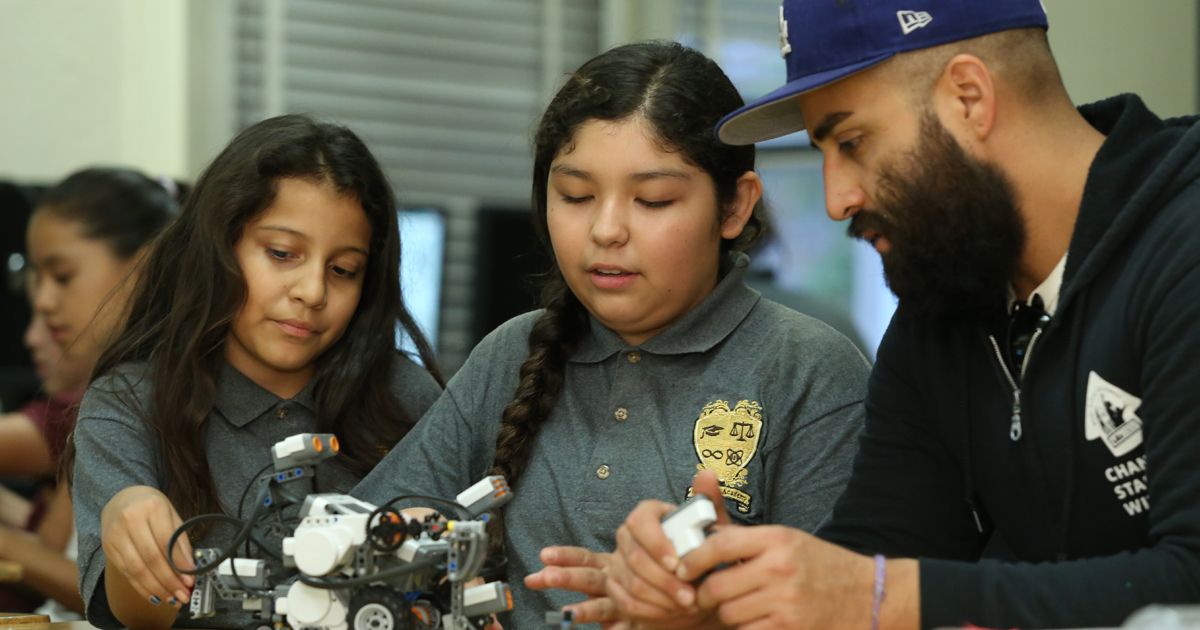
8) Revisit your vision.
Put a note on your calendar in five weeks, three months, and six months to circle back to these questions.
- What have we achieved so far, and how did we do it?
- Where have we gotten stuck, and why do we think we got stuck? What will get us back on track?
9) Refine your vision.
Setting a vision is an ongoing process, so it may feel like things happen in fits and starts. When you revisit your vision, make adjustments as you learn more. Reconvene your stakeholders periodically as part of your process to assess progress and make revisions.
>>TAKE ACTION
Take what you have learned in this module, and start implementing a digital learning vision for your program. Use the following questions to jumpstart the process.
- What is our first step to set a vision for digital learning in our program?
- How can we get staff excited about setting a vision for digital learning?
- Who can be a champion to help promote the vision setting process?
- How are we including students and creating teachable moments within the vision setting process?
>>WHAT'S NEXT
- Continue learning with the next module of the Toolkit.
- Video Training Recordings
- Share your thoughts and participate in community chats on Twitter by using the hashtag #AfterschoolTech.
National AfterSchool Association • 2961A Hunter Mill Road, #626 • Oakton, VA 22124 • info@naaweb.org